 TraceForge
Create and refine a Plan
Ask questions, review dependencies, refine a revision and build a candidate.
On this page
Start with a bounded objective
Save your project, check the Agent's project name and select Plan in the composer, or enter /plan followed by your objective. State the intended outcome, affected objects, constraints and what must not change.
For example, on a disposable project: “Plan a change to the title-block comment only. Identify the affected file and a check that board connectivity remains unchanged. Do not build or apply yet.” A Plan is a versioned project artifact—not simply a Markdown answer.
Answer questions before execution
The Agent may ask for a design choice, missing constraint or clarification. Read the complete question and its options. Select an answer or enter your own where offered, then submit it through the question interface.
An unanswered question is not permission to guess. If the project changed while you were answering, recheck the assumptions before continuing. If an answer fails to send, restore the same conversation and inspect its state rather than creating a second Plan.
Open and inspect the Plan
Select Open Plan on the conversation handoff. In the main project-area view, inspect the objective, assumptions, steps, dependencies, affected files, checks and expected evidence. Expand a step to see its completion criteria.
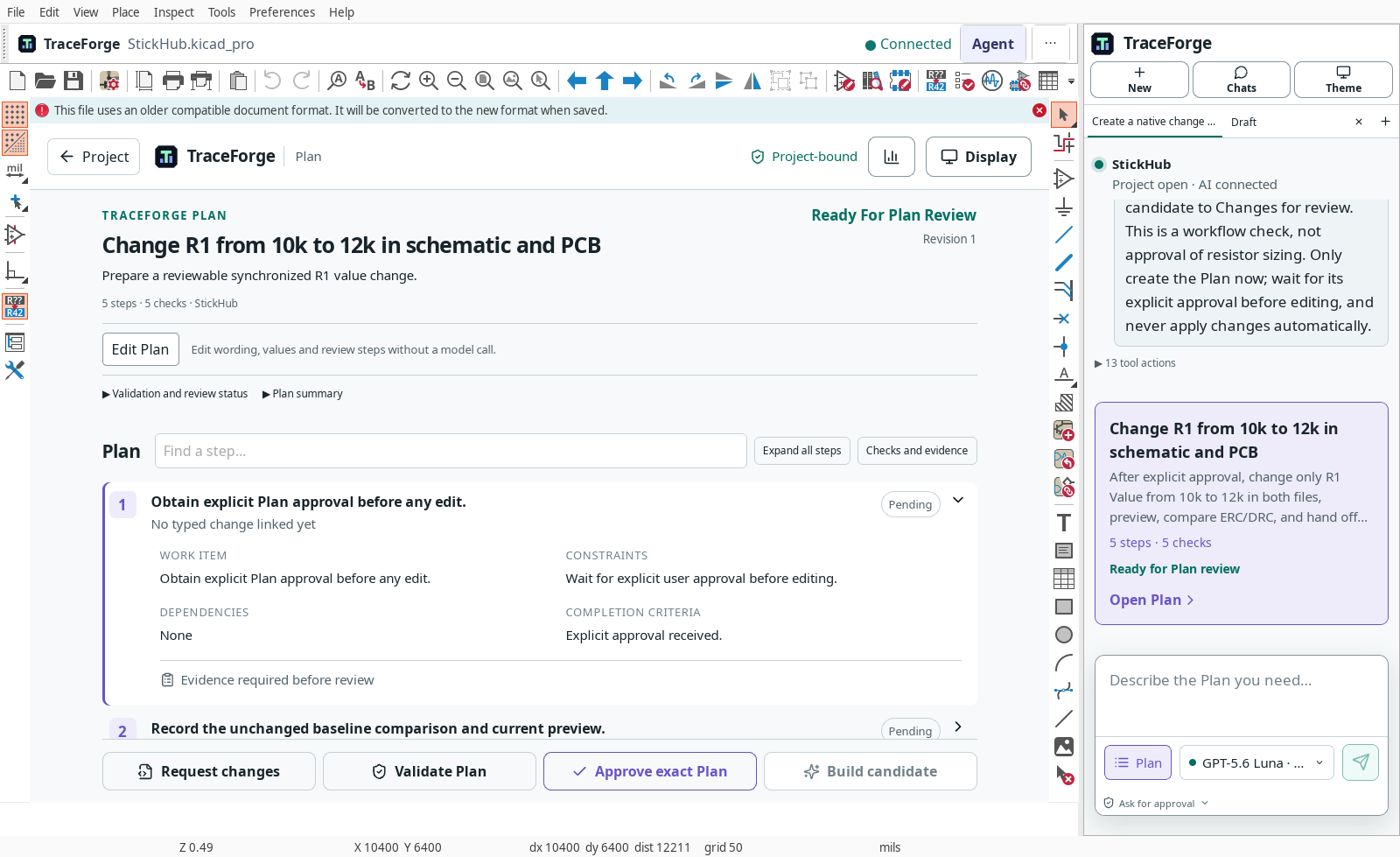
Recorded Linux interface example from a retained acceptance task; native window chrome differs on Windows. The example is a workflow demonstration, not advice to change a resistor value.
Ask whether the sequence is sufficient: which files will change, what should stay unchanged, which checks will run and what result would cause rejection? Missing validation should not become a green check merely because the prose sounds complete.
Refine and approve
Use Edit Plan for supported text edits without a new model request. Use Request changes for refinement requiring the Agent. Re-read the resulting revision and its dependencies; an earlier approval must not silently authorize a changed Plan.
Use Validate Plan to check the artifact's required structure and review conditions. This is not electrical validation of an unbuilt design. When satisfied, select Approve exact Plan. Approval of this Plan permits the planned candidate work, not automatic application to the trusted project.
Build and inspect the candidate
Choose Build candidate when available. Watch the tool activity, answer genuine permission requests and inspect the step outcomes. Open the resulting Compare before and after handoff for change review.
Expected result: a candidate revision, actual validation evidence and explicit apply/reject controls. An inventory result alone is not a completed implementation. Missing previews or failed checks must remain visible.
Resume interrupted work
After Stop, a disconnect or restart, reopen the project and conversation, then open the retained Plan. Check its revision and current state before continuing. If the trusted project changed, refresh the scope and review rather than reusing stale approval.
Keep the run identifier if state cannot be restored. Do not delete the Plan or fabricate a replacement just to remove an error message; use troubleshooting.