 TraceForge
Review and recover changes
Compare before and after, reject or apply a reviewed revision, and roll back safely.
On this page
Before work starts
Save outstanding editor changes, confirm the project and keep a backup. The Before baseline must match the project you intended to change. The Agent works on an isolated After candidate; a worktree alone is not a security boundary.
Approvals refer to exact revisions. Treat changing, still-generating previews as provisional, not as the revision you have approved.
Open changes from the conversation
Select Compare before and after on the change handoff, or enter /review. Review opens in the project workspace rather than squeezing a technical diff into the chat composer. Check the Before and After selectors and the changed-file list.
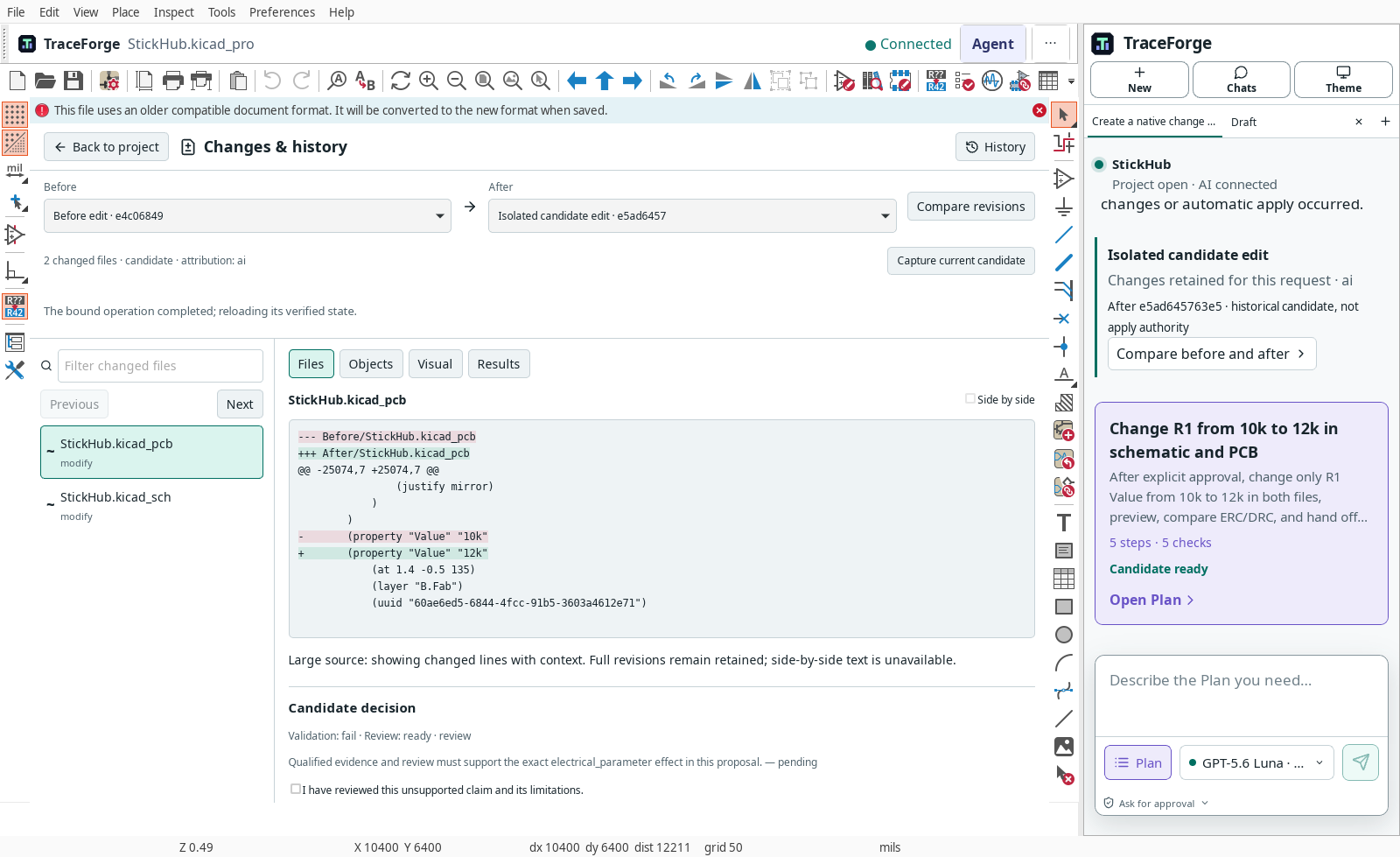
Retained Linux interface capture: the file diff is real and the validation failure is intentionally visible. This is not a passing engineering result.
Inspect the four views
- Files: inspect additions, removals and changed lines. Select each affected file. Large or binary files may have a limited preview; download or inspect the exact artifact where appropriate.
- Objects: examine supported component, connection and board-object changes. Uncertain matching or an unsupported object type is not “no changes.”
- Visual: compare the same region and layers. A visually identical board can still have changed electrical properties.
- Results: read ERC/DRC and other recorded evidence, including tool version, source revision and warnings.
Use review notes to record questions and mark inspected items. A reviewed marker is not approval to apply. Check that the displayed preview and results belong to the same candidate revision as the diff.
Reject or apply deliberately
Reject when the change is wrong, incomplete or outside scope. It leaves the trusted project untouched; retain the candidate evidence if you need to explain why.
For application, resolve required review and validation conditions, inspect any unsupported claim and approve the exact candidate. Confirm the final native application step. If the trusted project has changed since capture, stop and reconcile the conflict rather than overwriting newer work.
Do not use arbitrary line-level acceptance for a structured schematic or board. Partial acceptance is appropriate only where the application offers a dependency-safe operation. Otherwise ask for a smaller candidate and review it again.
Verify and roll back
After application, reopen the affected files, inspect the intended objects and rerun the relevant checks. Save and retain the resulting history. Applying files is not manufacturing approval and must not deploy firmware or operate hardware.
To undo a reviewed application, use the offered history/recovery operation and inspect its exact target revision. If you made later unrelated edits, resolve conflicts first; do not restore an old whole-folder backup over those changes. Keep both copies when uncertain.
Interrupted or missing evidence
Reconnect and restore the existing conversation before starting again. Preserve the failed run identifier. A missing preview, expired review, stale baseline or failed validation is a reason to investigate—not a success indicator. Contact review support with the step and safe error text, not private project data by default.